Use @Image1, @Image2, @Image3, and @Image4 as precise sequential…
Промпт
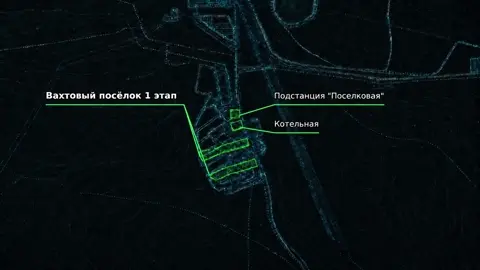
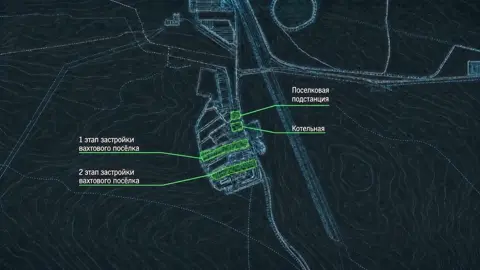
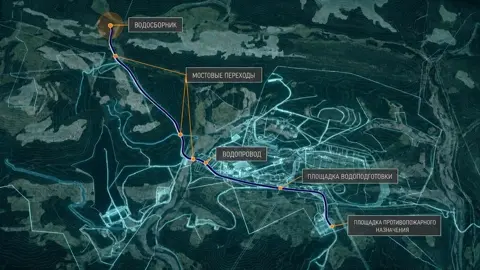
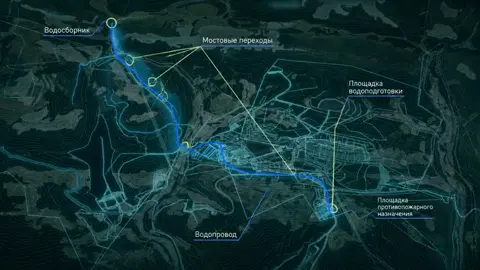
Use @Image1, @Image2, @Image3, and @Image4 as precise sequential references. They show connected areas of one massive continuous holographic engineering map. @Image2 is a closer view located INSIDE the same map shown in @Image1. Preserve every visible element from all references: map geometry, relief contours, structures, colored areas, callouts, leader lines, caption plates, and all original Russian text. Do not add, delete, move, redesign, correct, translate, replace, or invent anything. CAMERA ROUTE — ONE CONTINUOUS 15-SECOND SHOT: Distant view → move forward to @Image1 → continue moving significantly closer into the SAME map, aiming slightly LEFT of the center of @Image1 until the framing naturally matches @Image2 → move strictly LEFT to @Image3 → reverse direction and move strictly RIGHT to @Image4. Divide the duration approximately equally between the four stages. No cuts, crossfades, morphing, slideshows, image replacement, or sudden framing changes. CRITICAL OUTLINE RULE: All animated perimeter tracing must use a thin, clean WHITE holographic glow ONLY. NO RED OUTLINES. NO COLORED OUTLINES. First, the WHITE line precisely traces the complete perimeter and technical shape of an element. Only after the white outline is completed does a subtle interior illumination appear in the EXACT ORIGINAL COLOR shown in the corresponding reference. Do not recolor any areas. The animated outline is always white; the interior preserves its original reference color. SHOT 1 — @Image1: Begin with a distant view of the quarry map and quickly move forward toward @Image1. The base map is already visible as thin bluish-blue holographic engineering lines against a dark background. Quickly reveal all marked elements one by one. For each element: 1. Trace its exact perimeter with a thin WHITE glowing line. 2. After the perimeter is complete, reveal a restrained interior glow in its EXACT ORIGINAL COLOR. 3. Extend the original leader line from its precise attachment point. 4. Reveal the original caption plate and unchanged Russian text. Do not create a red border around the quarry or any other zone. Every completed element remains illuminated, stable, and firmly attached to the map. TRANSITION FROM @Image1 TO @Image2: @Image2 is NOT a separate fragment entering from outside the frame. It is a closer internal view of the SAME map shown in @Image1. After revealing @Image1, continue moving strongly FORWARD into the same map. Aim slightly LEFT of the center of @Image1. The dominant movement is forward, with only a small simultaneous shift to the left. Do not move downward. Do not make @Image1 exit through any side. Do not bring @Image2 in from an edge. The visible geometry of @Image1 must naturally enlarge until the closer internal view precisely matches @Image2. This must feel like physically approaching a specific area located slightly left of center inside the first map. No cut, slide, morph, crossfade, or image substitution. SHOT 2 — @Image2: Smoothly decelerate when the closer view reaches the exact framing of @Image2. Maintain subtle controlled camera movement without jitter or additional automatic zooming. Reveal each marked area and structure sequentially: 1. Trace the exact perimeter with a thin WHITE holographic line only. 2. After completing the outline, reveal the original-colored interior glow. 3. Reveal the attached leader line, caption plate, and unchanged Russian text. Keep all completed elements visible, stable, and fixed to their exact map positions. TRANSITION FROM @Image2 TO @Image3 — STRICTLY LEFT: Move horizontally and strictly LEFT across the same continuous map. No upward, downward, diagonal, forward, or backward movement. @Image2 exits through the RIGHT side of the frame while @Image3 enters from the LEFT. This is a controlled physical camera flight across one continuous map, not a slide or slideshow. SHOT 3 — @Image3: Smoothly decelerate over @Image3 without jitter or auto-zooming. Reveal all marked zones and structures sequentially: 1. Trace each exact perimeter with a thin WHITE glowing line only. 2. After the white outline is complete, reveal the interior glow in the EXACT ORIGINAL COLOR. 3. Reveal the original attached leader line, caption plate, and unchanged Russian text. All completed elements remain visible, illuminated, stable, and firmly attached. TRANSITION FROM @Image3 TO @Image4 — STRICTLY RIGHT: Reverse direction and move horizontally and strictly RIGHT. No vertical, diagonal, forward, or backward movement. @Image3 exits through the LEFT side while @Image4 enters from the RIGHT. Preserve the feeling of movement across the same enormous continuous engineering map. SHOT 4 — @Image4: Smoothly decelerate over @Image4. Sequentially reveal every marked area and structure: 1. Trace the exact perimeter with a thin WHITE holographic line only. 2. After completing the white outline, reveal the subtle interior illumination in the EXACT ORIGINAL COLOR. 3. Reveal the original attached leader line, caption plate, and unchanged Russian text. Hold the fully completed @Image4 until the final frame. ABSOLUTE PRESERVATION: All Russian text must remain identical to the references, clear, legible, complete, and motion-stabilized. Preserve its exact spelling, punctuation, capitalization, line breaks, scale, position, and alignment. Do not rewrite, correct, translate, or regenerate it. Preserve all map contours, relief, structures, zones, original colors, spatial relationships, callouts, leader lines, and caption plates. Everything must remain rigidly attached to its exact original position. Do not add new borders, structures, zones, lines, labels, symbols, or effects. Do not remove or hide anything. WHITE OUTLINES ONLY. NO RED OR COLORED OUTLINES. Interior areas retain their exact original reference colors. No excessive bloom, fog, grain, jitter, fisheye distortion, abrupt zoom, cuts, crossfades, morphing, or slideshow transitions.
Сделано на модели Seedance 2.0. Скопируй промпт, поменяй под себя и запусти — попробовать бесплатно.
Ещё от Roman
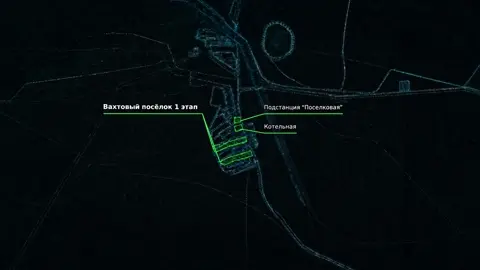 видео
видеоTRANSITION FROM @Image1 TO @Image2 — CONTINUED FORWARD…
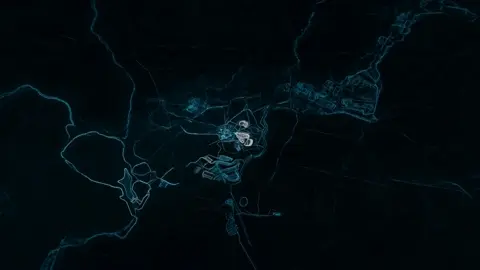 видео
видеоUse @Image1, @Image2, @Image3, and @Image4 as precise,…
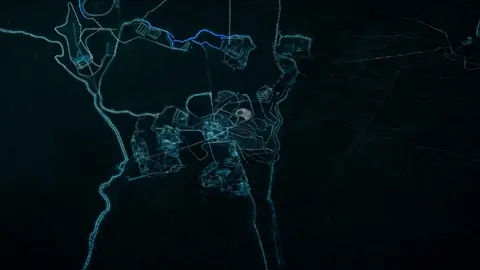 видео
видеоUse @Image1, @Image2, @Image3 and @Image4 as exact…
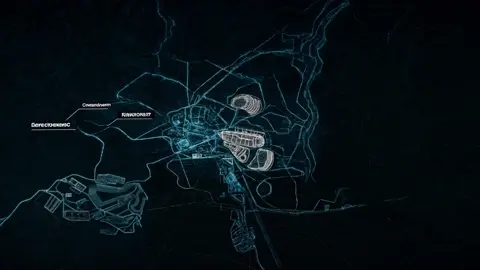 видео
видеоUse @Image1, @Image2, @Image3 and @Image4 as exact…
 видео
видеоMAP FRAGMENT REFERENCE. Carry forward exactly: terrain,…
 видео
видеоCinematic 6-second map visualization, precise technical…
сделай на первом фото подписи к обозначениям в виде сносок…
Смотри, мне надо, чтобы ты опять-таки поменял числа на…
Повтори это за минуту
Вставь промпт, поменяй под себя — получишь свой вариант. Без VPN, оплата картой РФ и СБП.
Попробовать бесплатно →